
Customize Your Open Source Intelligence with AVL Insight
Overview
AVL Insight is a Chrome browser extension designed to streamline the process of gathering and organizing open source intelligence (OSINT). It integrates directly into the browsing experience, allowing users to collect, annotate, and manage intelligence data while reading articles or web content. The tool is particularly useful for cybersecurity analysts, threat researchers, and digital investigators who need to extract and structure relevant information from online sources efficiently.
By enabling users to mark text, extract key data points, and store findings in a personalized intelligence library, the extension reduces the time and effort traditionally required to manually sift through large volumes of web content. It is built to complement the AVL Insight mobile threat intelligence platform, enhancing data accessibility and workflow continuity across devices.
Target users include professionals in threat intelligence, cybersecurity operations, and digital forensics. The extension supports a seamless workflow where users can extract indicators of compromise (IoCs) such as MD5 hashes, email addresses, and URLs directly from web pages. The developer did not provide additional system requirements or background details beyond the product name and platform.
Key Features & Capabilities
- Smart Extraction – Automatically identifies and extracts key information from web content, including MD5 hashes, email addresses, and URLs, enabling rapid intelligence gathering.
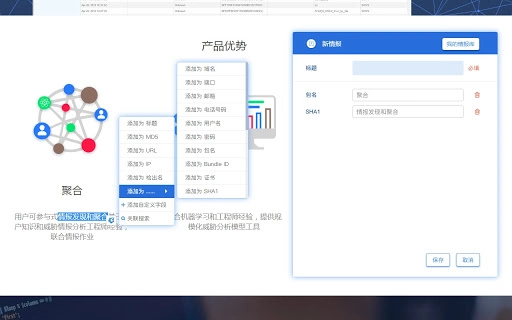
- Text Highlighting & Tagging – Users can select any text on a webpage, trigger the extension, and assign custom attributes to the selected content for personalized data tagging.
- Personal Intelligence Library – All generated intelligence is stored in a centralized, user-managed repository, where entries can be viewed, edited, or deleted as needed.
- CSV Export Functionality – Users can filter and export multiple intelligence entries in CSV format, allowing for offline analysis and integration with other tools.
- Custom Field & Category Management – Users can define custom attributes and organize them into categories, enabling tailored data structuring to match specific investigative workflows.
- One-Click Login with Insight Account – Simplifies access with secure, single-sign-on functionality, reducing friction during login and minimizing account switching.
- Platform Integration – Leverages the AVL Insight mobile threat intelligence platform’s data for enhanced search capabilities and context-aware insights.
- Batch Export Support – Allows users to export large volumes of intelligence data in a single operation, improving efficiency during large-scale investigations.
These features are designed to support real-time data collection during research sessions. For example, a cybersecurity analyst reviewing a threat report can extract IoCs, tag them with custom labels, and save them to their personal library—all without leaving the browser. The ability to link back to original sources via article titles further enhances traceability and verification.
User Interface, Workflow & Performance
The extension integrates seamlessly into the Chrome browser interface, with a compact icon that changes based on login status. Upon activation, it presents a clean, intuitive popup window that guides users through extraction, tagging, and management tasks.
Navigating between features—such as accessing the intelligence library, managing custom fields, or exporting data—is straightforward, relying on a menu-based structure within the extension’s interface. The workflow is designed to minimize interruptions, allowing users to remain focused on their research while collecting and organizing data.
Performance observations are based on general software behavior patterns. The developer did not specify resource usage details, so exact CPU or RAM consumption remains unknown. However, given the extension’s size of 1.5 MB and its focus on client-side processing, it is expected to operate efficiently on modern systems. Stability during extended use was not detailed, but the lightweight nature of the tool suggests low risk of browser slowdowns.
Compatibility & System Requirements
AVL Insight is compatible with both Windows and Mac operating systems. It is designed as a Chrome browser extension, meaning it requires Google Chrome to function. The extension version is 1.0.0, with a file size of 1.5 MB, which is typical for lightweight browser tools.
Exact system requirements were not listed. Compatibility with specific Chrome versions or hardware configurations is limited in the provided information. Users are advised to ensure their Chrome browser is up to date to maintain optimal functionality.
Pros and Cons
Pros
- Efficient, real-time OSINT collection during web browsing
- Intuitive interface with minimal learning curve
- Supports custom field creation and categorization
- One-click login simplifies access to the AVL Insight ecosystem
- Batch export to CSV enables seamless data transfer
- Lightweight at only 1.5 MB
- Free to use with no licensing restrictions
Cons
- Only available as a Chrome extension, limiting cross-browser use
- No public documentation on performance under heavy workloads
- Dependent on external platform (AVL Insight) for full functionality
- Custom field management requires navigation to separate menus
- Exact system requirements were not specified
FAQ Section
Is AVL Insight compatible with browsers other than Chrome?
The extension is currently designed exclusively for Google Chrome. No support for other browsers was mentioned in the provided information.
Is the software secure to use?
As a browser extension, AVL Insight operates within Chrome’s security sandbox. It requires user authentication via the AVL Insight account. The developer did not provide specific security audits or third-party verification details.
How often are updates released?
Update frequency was not specified. Users are encouraged to check for updates through the Chrome Web Store.
Can I use AVL Insight without an AVL Insight account?
Users must register and log in using an AVL Insight account to access full functionality. The extension is not usable in a fully anonymous or standalone mode.
Is the data stored locally or on the cloud?
Data is managed through the AVL Insight platform, which implies cloud-based storage. Local storage of exported files is possible via CSV exports, but the primary intelligence library is likely hosted on the platform’s servers.
Final Thoughts + CTA
AVL Insight delivers a focused, efficient solution for professionals engaged in open source intelligence work. Its ability to extract, tag, and organize data directly from web content significantly reduces manual effort and enhances investigative accuracy. The integration with the AVL Insight platform adds contextual value, while the free pricing model removes financial barriers to entry.
While its Chrome-only availability and lack of detailed system specifications are limitations, the tool’s lightweight design, intuitive workflow, and powerful export capabilities make it a strong candidate for threat analysts and digital investigators. For those seeking a streamlined way to build a personal intelligence library during research, this extension offers real value.
Download AVL Insight now







